Here you will find a Step by Step tutorials and Videos on How To navigate and use Quiif
Home » Close a ride Request
How to Close a Ride Request
Once your ride is satisfied, you should close it to avoid receiving messages from other drivers.
You should Close a Ride Request ass soon as a driver is on the way
Simply follow these steps:
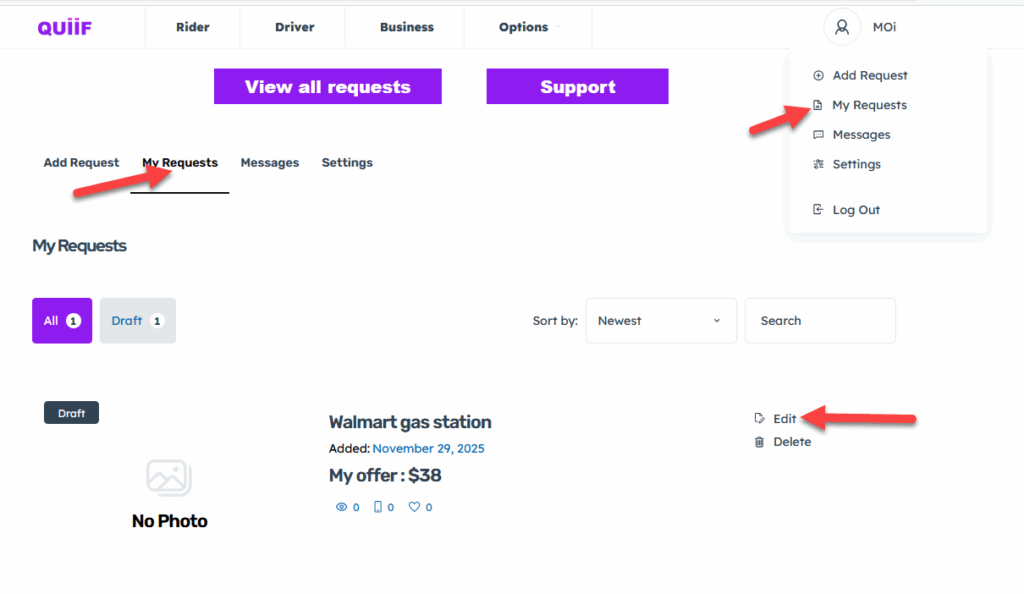
Hover over your profile image icon on the top right hand side and click on My Requests. Or just click on My Requests Request on the second menu
Then click on “Edit“
Simply change the “Ride Status” from Active to Closed and scroll down to click on the Add Request button Once again to save your changes
Finally, scroll down and click on the “Save Requests” button to save your changes