
Need help? We've got you covered.
Here you will find a Step by Step tutorials and Videos on How To navigate and use Quiif
Home » User Panel
User Panel
All About Your User Panel
Once you Register and Log Into your account, you will be taken directly into your User Panel.
Your User Panel is your back office.
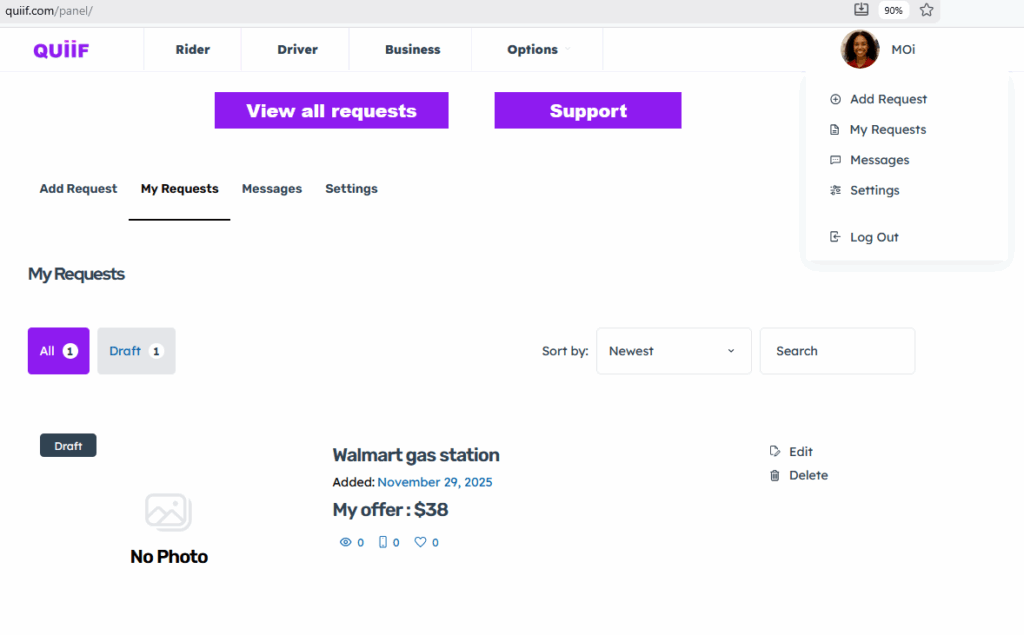
This is where you do everything on the Quiif platform, such as Requesting a new ride, add your vehicle information, etc.
Add Request: Use this tab to add a New Ride Request, Close a Request, Add your Vehicle, etc
My Requests: Use this tab to view all your requests. This is helpful for your own documentation and also when you want to close a Request
Messages: This is where you see all the conversations with drivers or riders
Settings: Use this tab to update your personal information and your business or vehicle information
View All Requests: This button is mainly for Drivers. You should use this button to see available rides or newly added ride requests.
This is button takes you to the Search Results page were you can refine your search.
For example, you might just want to pick up ride requests in a particular Zip code, city or State etc…
Support Button: This button takes you to the Suport Hub, the knowledge base where you can find details about everything on the Quiif platform